


Viking Voyager
4.6841.00 Reviews
App Specs
- Version
- v1.40.6
- Updated On
- License
- Free
- Downloads
- 100,000+
- Developer
- Viking Cruises
- Categories
- Travel & Local
- Platform
- Android
Screenshots
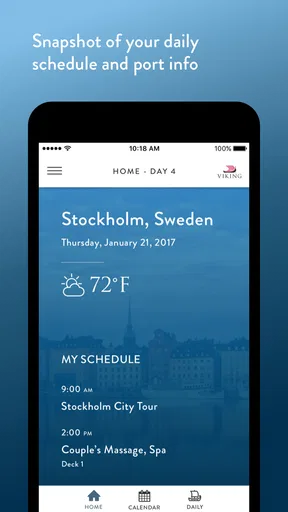
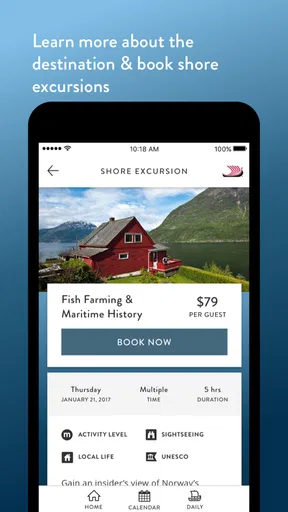

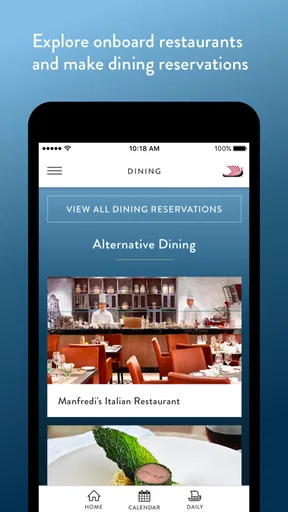
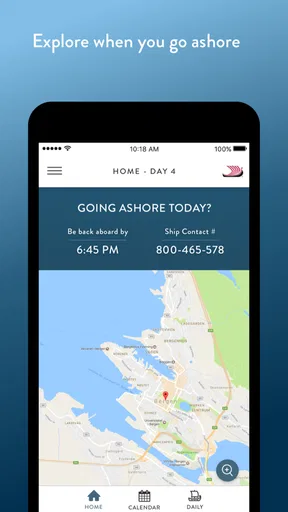
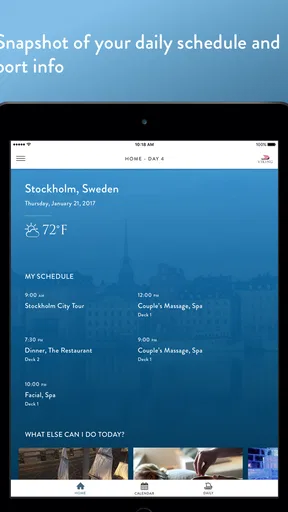
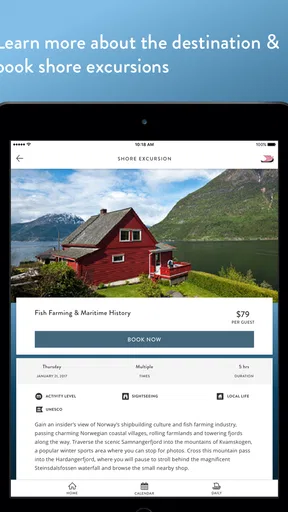
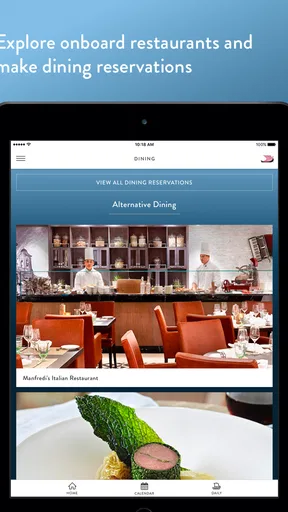
 Analysis by AppCompare
When I use a cruise companion app, I want it to reduce the small bits of friction that appear throughout a trip: checking what is happening, remembering where I need to be, and keeping the ship experience organized without carrying a folder of printed information. That is the role Viking Voyager tries to fill. It is a free Travel & Local app from Viking Cruises, designed for guests sailing on Viking Ocean, River, and Expedition ships.
My first impression is that it works best as a practical onboard reference rather than as a complete travel planner. It is closely tied to the Viking experience, so its value becomes much clearer once a trip is underway. Before sailing, it can help establish expectations, but its strongest use is keeping ship-related information close at hand while the journey unfolds.
The app has been available since June 26, 2017, and its current version is v1.40.6. It is suitable for Everyone and supports devices running Android 7.0 or later. Viking Cruises has built a recognizable companion tool here, and its audience is reflected in the response: it holds a 4.6 average from around 2.4 thousand ratings, with over 100 thousand installs and around 841 written reviews.
How I use Viking Voyager during a normal sailing day
I treat Viking Voyager as a quick checkpoint rather than something to keep open all day. A glance before breakfast helps me decide what needs attention, while another check before going ashore lets me focus on the outing instead of trying to recall details later. That routine also makes it easier to notice when I need a separate tool or a direct answer from staff.
A simple baseline workflow
I would begin by opening the app before the day gets busy and looking for the information that affects my schedule. On a cruise, the challenge is rarely finding one isolated detail; it is remembering several details at once. A morning activity, a meal plan, an excursion, and a return time can all compete for attention. A companion app is useful when it turns those separate decisions into one place to check.
My preferred habit is to review the day in one sitting instead of opening the app repeatedly without a plan. I look at what I have already arranged, identify anything time-sensitive, and then decide what deserves a reminder in my own phone if necessary. This matters because I do not want to depend on memory while moving between a ship, a port, and a scheduled activity.
The app is especially sensible for travelers who dislike carrying printed schedules. It can act as a digital reference for the Viking portion of the trip, while the phone’s ordinary calendar, maps, camera, and notes remain useful for everything outside that experience. I would not treat it as a replacement for every travel tool on my device. Instead, I see it as the place where the cruise-specific layer belongs.
Worth Reading Before You Choose

Flipboard Shows What News Apps Must Do Beyond the Feed

Switching to Android Auto Means Rethinking Your Driving Routine

Google Calendar Makes a Crowded Week Easier to Manage

Ludo King Makes the Most of the Minutes Between Plans

Baby Panda World Brings Quick Play to Modern Phones, but Its Game Library Feels Busy

ESPN’s Live Game View Makes Following Close Games Easier
A realistic example is an afternoon in port. I might check the day’s plan after breakfast, confirm the time connected with an excursion, and save a screenshot or note of anything I do not want to search for again. Later, when the ship is busy and connectivity or attention is limited, that preparation can be more valuable than discovering another feature. The best workflow is to prepare before leaving the ship, not to investigate details while already rushing.
What the app is good at organizing
Viking Voyager makes the most sense for guests who want a single cruise-focused starting point. Instead of jumping between general travel websites, emails, and scattered notes, I can begin with the app whenever my question concerns the Viking sailing itself. That narrower focus is also its main advantage over broad travel applications: it is not trying to cover every airline, hotel, city, or independent tour provider.
For a first-time cruiser, that focus can make the trip feel less fragmented. For an experienced traveler, it can serve as a quick reference that keeps the cruise information separate from personal travel research. I find that separation useful because it prevents restaurant ideas, transport notes, and ship details from becoming one large, confusing list.
There is also a social benefit to using a dedicated companion app. If two people in the same cabin are planning differently, both can check the same cruise-oriented source rather than relying on one person’s memory. I would still agree on a meeting point and a backup plan, but the app can reduce the number of “what time was that?” conversations.
Settings and preparation worth checking
The first setting I would check is notification behavior. Travel apps can become annoying when they interrupt constantly, but they can also be useful when a message is genuinely relevant to the day. I prefer leaving important travel alerts available while limiting distractions elsewhere on the phone. The exact choices available can vary by device and app version, so I would review the notification controls rather than assume every alert should remain active.
I would also check the app before departure, while I have reliable internet access and enough time to become familiar with its layout. This is a small habit, but it prevents a common mistake: waiting until boarding or arriving in port to discover that I do not remember where a particular piece of information is located. A few minutes of preparation can make the app feel much faster later.
Another useful setting-related habit is managing phone storage and battery expectations. I do not assume that a travel companion app should replace a printed backup or the phone’s normal tools. If I am spending a long day away from a charger, I reduce unnecessary background activity, carry a power bank when appropriate, and keep essential confirmations available in another form. That is not a criticism unique to Viking Voyager; it is sensible travel discipline.
I would also make sure the device itself is compatible. The app supports Android 7.0 and newer, which covers many older Android phones, but anyone traveling with an aging device should still install and test it before the trip. A working app at home is more reassuring than discovering an operating-system problem after boarding.
Faster patterns for repeat users
After using the app a few times, I would stop treating it like something to explore from scratch. Repeatable habits are quicker. I check the app at a consistent point in the morning, revisit it before leaving the ship, and look again when returning to the vessel. Those three checkpoints match the natural rhythm of a cruise day and reduce random checking.
I also separate “need to know now” information from “nice to remember” information. The first group includes anything connected with a time, location, or commitment. The second group can wait. This simple distinction keeps me from spending too long browsing when I only need one answer.
For shared travel, I would use a short personal checklist alongside the app. It might include identification, medication, room key, phone, and the time I need to return. Viking Voyager can handle the cruise-information side of my routine, but it should not become the only place where I keep critical personal reminders. Use the app as the cruise reference, and use your phone’s ordinary tools for personal safety and backup planning.
A further shortcut is to prepare questions before opening the app. Rather than scrolling aimlessly, I ask myself whether I need today’s schedule, a ship-related detail, or information connected with a port visit. That makes the experience more efficient and helps reveal whether the app is answering my question or whether I should switch to a map, calendar, email, or browser.
Where it compares well with ordinary alternatives
The usual alternative is a mixture of printed material, email confirmations, a general travel app, and conversations with staff or fellow travelers. That mixture can work, but it spreads information across several places. Viking Voyager has the advantage of giving Viking guests a dedicated digital entry point for the onboard experience.
Compared with a general itinerary manager, the app is more naturally suited to cruise-specific information. A broad travel app may be better for combining flights, hotels, rail journeys, and independent reservations across several companies. If my vacation includes a complicated pre-cruise or post-cruise itinerary, I would still use one of those broader tools alongside Viking Voyager.
Compared with paper, the app is easier to carry and potentially easier to revisit when plans change. Paper remains valuable as a backup, especially for travelers who prefer not to use a phone throughout the day. Compared with asking staff, the app can be faster for routine checks, while staff remain the better choice when a situation is unusual, urgent, or unclear.
This is why I would not describe the app as universally necessary. Its usefulness depends on whether I am actually taking a Viking Ocean, River, or Expedition cruise. For someone planning an independent city break, a standard maps app and a general itinerary tool would be more appropriate. For a Viking guest, however, the dedicated focus is precisely what makes it worthwhile.
Advanced limits and points of friction
The biggest limitation is the app’s dependence on context. It is not a general-purpose travel assistant, and I would not expect it to manage every part of a holiday. Its usefulness is strongest when the trip is connected to Viking, so people outside that audience may find little reason to keep it installed.
I also avoid assuming that an app can replace direct confirmation. Travel plans can change, and a digital display can be misunderstood if I read it too quickly. When timing is critical, I compare the information in the app with the latest communication available to me and ask staff if anything seems inconsistent. That extra step is especially important around excursions, departures, and return times.
Another limitation is the small screen. A phone is convenient, but it is not always the easiest place to study a full day of plans or compare several options. I prefer using the app for quick checks and decisions, not for extended browsing. If I need to think through a complicated day, I write a short outline in my notes so that the app does not become a source of repeated scrolling.
There is also a learning curve for guests who rarely use travel apps. The interface may feel obvious after a few visits, but the first session can still require patience. I would install it early, sign in or set it up before the busiest part of the journey, and show a travel companion the basic path to the information we are likely to need.
Who should use it, and who should skip it
I recommend Viking Voyager to Viking passengers who want cruise information available on their phone and who are comfortable checking a digital companion during the day. It is a particularly good fit for organized travelers, couples coordinating plans, and guests who prefer a central reference instead of several printed pages.
It is also a reasonable choice for people who want to build a repeatable travel routine. Checking the day once in the morning, once before going ashore, and once before returning creates a dependable pattern without requiring constant attention. That is more useful than simply installing the app and hoping it will solve every planning problem automatically.
I would skip it if I am not traveling with Viking, if I strongly prefer paper-only planning, or if I expect one application to manage flights, hotels, independent tours, maps, and personal reminders together. In those cases, a general itinerary manager or the phone’s built-in tools may be a better match. The app’s narrow purpose is a strength for the right traveler and a limitation for everyone else.
Value, compatibility, and everyday practicality
Because the app is free, the decision to try it is straightforward for an eligible Viking guest. There is no purchase price standing between the traveler and the basic experiment of installing it before sailing. I would still judge its value by how often it saves me from searching through messages or asking for routine information, not simply by the fact that it costs nothing.
The Everyone content rating makes it suitable for a broad travel audience, including families using a shared planning approach. The Android requirement is also relatively accommodating, although I would not wait until the last day to test an older phone. A current installation and a quick practice session are the easiest ways to avoid preventable stress.
For iPhone users, the same practical advice applies: install it before travel, review alerts, and keep a backup of essential personal information. I would not assume that changing platforms removes the need for preparation. The important habit is understanding where the cruise information lives and what I will do if my battery, connection, or attention becomes limited.
My mastery verdict
After looking at the app as a daily tool rather than a simple download, I see Viking Voyager as a focused companion for Viking guests. It does not need to compete with every travel application. Its job is to keep the cruise experience easier to navigate, and that narrow job gives it a clear place in a traveler’s routine.
My recommendation is strongest when the app is paired with good habits: install it before departure, check notification preferences, review plans at predictable moments, and keep personal backups for anything essential. Those habits make the experience smoother than repeatedly opening the app without a purpose.
The trade-off is equally clear. Travelers outside the Viking ecosystem, or those seeking a complete all-in-one itinerary manager, should choose a broader alternative. Even Viking passengers should continue using maps, calendars, email, and direct staff assistance when those tools are better suited to the question.
For the right audience, though, Viking Voyager is a sensible free addition to the phone. I would recommend it to a friend taking a Viking Ocean, River, or Expedition sailing, especially if that friend wants less paper, fewer scattered reminders, and a repeatable way to stay oriented throughout the day. It is most valuable not as a flashy travel app, but as a quiet piece of organization that helps the onboard experience feel more manageable.
Pros
- Simple controls make the game easy for newcomers to pick up.
- Short sessions are convenient for playing on the go.
- Colorful Viking-themed visuals give the game a distinct personality.
- Progression rewards regular play and encourages continued exploration.
- Offline play is useful when traveling or without a stable connection.
Cons
- Some levels can feel repetitive after extended play sessions.
- Difficulty spikes may frustrate players progressing through later stages.
- Ads can interrupt gameplay
- especially for users on the free version.
- The Viking theme is mostly visual and adds limited gameplay depth.
- Advanced upgrades may require considerable time or repeated grinding.
FAQs for Viking Voyager
What is Viking Voyager, and what kind of experience does it offer?
Viking Voyager is an adventure-focused game centered on exploration, travel, and Viking-themed challenges. Players can expect to navigate different environments, complete objectives, discover locations, and interact with gameplay elements inspired by Nordic legends and seafaring. The overall experience is designed for users who enjoy casual adventure, progression, and discovering new content rather than purely competitive action.
Is Viking Voyager free to download and play?
Viking Voyager can generally be downloaded without an upfront purchase, but users should check the store listing for the current pricing model in their region. Depending on the version, the game may include optional in-app purchases, advertisements, or premium items that improve progression or customize the experience. Parents should review purchase settings before allowing children to play.
Does Viking Voyager require an internet connection?
The internet requirements may depend on the feature being used and the version installed on your device. Basic gameplay may work offline in some situations, but online access can be necessary for downloading game data, displaying advertisements, synchronizing progress, receiving updates, or using connected features. It is best to launch the game once while connected and review its behavior before relying on offline play.
Is Viking Voyager suitable for children and younger players?
Viking Voyager may be suitable for younger players who enjoy fantasy adventures, but parents should check the official age rating and content description before installation. The game may contain cartoon-style combat, advertisements, social features, or optional purchases. Reviewing privacy permissions and enabling parental controls is recommended, especially if the app will be used on a child’s Android or iOS device.
What devices are compatible with Viking Voyager, and how much storage is needed?
Compatibility depends on the operating system version, device hardware, and the specific release available through Google Play or the App Store. Before downloading, check the official listing for supported Android or iOS versions and the required storage space. Keep additional free space available because updates and downloaded game resources can require more room than the initial installation package.


